
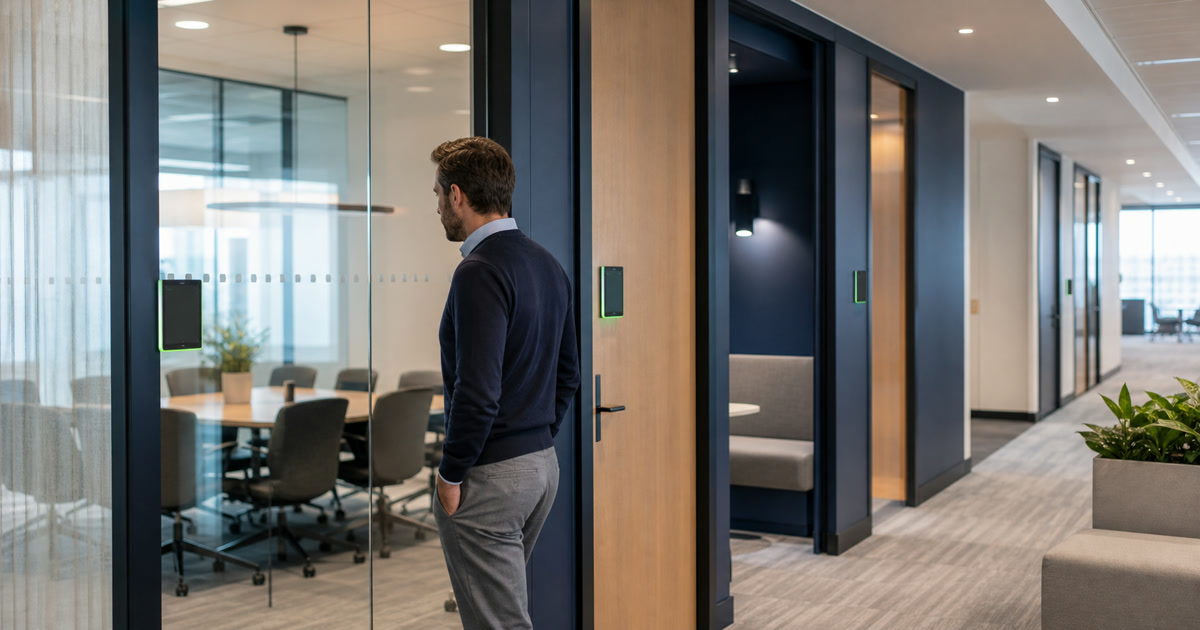
The question arrives as a single yes or no across an entire estate. Framed that way it can only be answered by habit, because an estate does not have one answer.
A scheduling panel is not one product solving one problem. It is a mounting position that solves up to four different jobs, and the platforms have moved several of those jobs onto surfaces that require no additional installation.
The useful decision is per room class.
What to settle before a panel program is scoped:
| Decision | Where it lands |
|---|---|
| Which of the four jobs is actually unmet | Finding a room, seeing it is free, reserving it and measuring use are not one product decision |
| Which room classes need it | Decide per class; a glass wall already answers the question a panel answers |
| What the console already does | Ad hoc reservation now sits on the Teams Rooms console with no extra hardware |
| What the console does not do | Reservation while the room is occupied, at the door itself |
| What the program actually costs | Mount, backbox, wall repair, pathway, PoE port, license, management, replacement |
Key Takeaways
- Separate four jobs before comparing products: find a room, see whether it is free before entering, reserve it, and measure or enforce use.
- Microsoft added ad hoc reservation to the Teams Rooms console. A Reserve button “appears on the calendar when the room is available” (Microsoft Learn, retrieved 2026-08-24).
- The panel retains one job the console does not: reservation while the room is occupied. Microsoft notes users “can scan the QR code at any point to reserve the room regardless of the room’s status.”
- Reservation status and occupancy are different facts. A room can be booked and empty, or occupied with no reservation.
- Panel cost is not the panel. It is the mount, the wall repair, the pathway, the PoE port, the license, the management, and the replacement.
On this page
- Four Jobs Wearing One Product Name
- What the Console Now Does Without a Panel
- The Job the Panel Still Owns
- Segment the Estate by Room Class
- Policy Decides More Than Hardware
- Count the Whole Cost, Not the Device
- Reservation Is Not Occupancy
- Run a Pilot That Can Return Four Answers
- Write the Journey Into the Room Standard
- Take the Room-Class Decision Into the Estate Review
Four Jobs Wearing One Product Name
Panel debates stall because the participants are arguing about different jobs.
- Find a room. Locate available space, sometimes on a floor the person does not know.
- See availability before entering. Decide at the door whether walking in is acceptable.
- Reserve it. Claim the space, now or for a meeting already on the calendar.
- Measure use. Know what was booked, what was used, and what was abandoned.
A hallway panel addresses the first three directly, and the fourth only as a by-product of its own interaction logs. A console addresses reservation well and the door not at all.
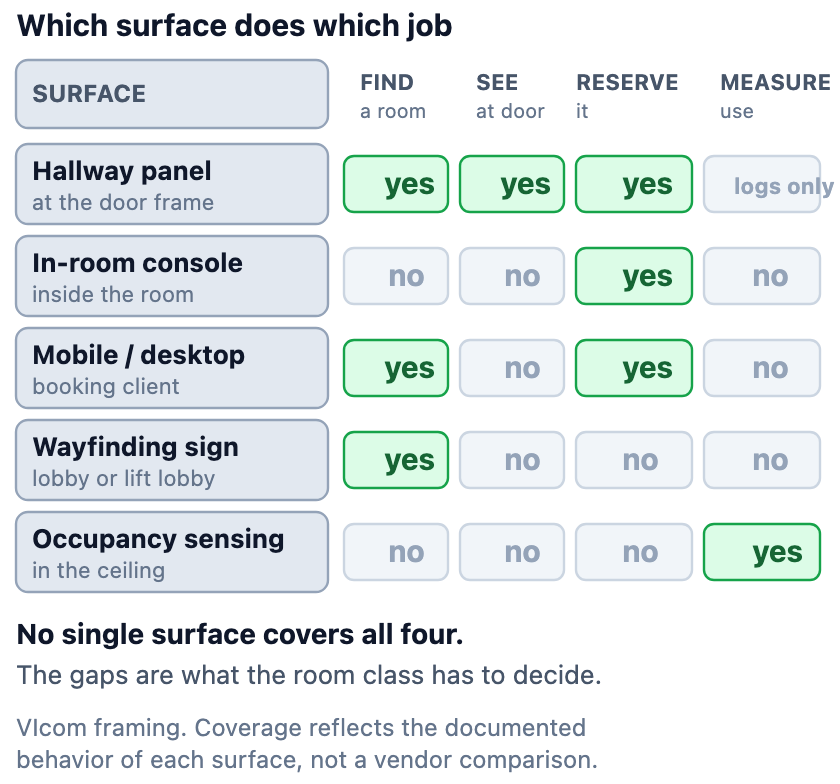
Naming the job first turns a product argument into a coverage question.
What the Console Now Does Without a Panel
The console has absorbed part of the panel’s role. That is the change worth planning against.
Microsoft documents ad hoc room reservation on the Teams Rooms home screen: “Allow users to quickly book the meeting room for immediate use, helping to avoid scheduling conflicts and ensure uninterrupted spontaneous meetings. A Reserve button appears on the calendar when the room is available” (Microsoft Learn, retrieved 2026-08-24).
The capability arrived in the room app rather than in a panel release: version 5.6.137.0 for Teams Rooms on Windows, dated 18 June 2026, and an April 2026 build for Teams Rooms on Android (Microsoft Learn release notes, retrieved 2026-08-24).
Administrator control differs by platform: the Pro Management Portal on Windows, Teams Admin Settings or a configuration profile on Android.
Two limits follow from the documented behavior. The button appears only when the room is available, and only on a console inside the room. A person deciding whether to open the door cannot use it.
The Job the Panel Still Owns
One documented distinction does more work than any vendor comparison.
Microsoft states that although users “can only use the Reserve button on the Teams Panel when the room is available, they can scan the QR code at any point to reserve the room regardless of the room’s status” (Microsoft Learn, retrieved 2026-08-24).
That is the panel’s remaining structural advantage: a person can stand outside an occupied room and claim it for later. Scanning opens the Teams mobile app, where the choice is to schedule a new meeting with the room already added, or to reserve it for a meeting already scheduled.
Three conditions attach, each a deployment question rather than a detail. Users must be in the same organization as the room. The panel must carry a Teams Shared Device or Teams Rooms Pro license. On Android devices with work profiles, the camera and the Teams app must sit in the same profile.
Segment the Estate by Room Class
The answer that survives contact with a floor plan is a policy per class, not a number per building.
| Room class | What the door-side job is worth |
|---|---|
| High-traffic shared rooms | High. Contention is the failure mode |
| Enclosed rooms with no glazing | High. There is no other way to know |
| Rooms with glass walls or a sightline | Low. The window already answers it |
| Huddle and focus rooms | Low where walk-up use dominates |
| Executive or restricted rooms | Policy-led. Signaling may matter more than booking |
| Training and event rooms | Low where booking is central and nothing is claimed at the door |
| Visitor-facing spaces | Presentation-led. Consider what the panel communicates |
| Rooms beside a staffed reception | Low. A person is already the interface |
Two rooms of identical size can land in different classes. Glazing and corridor traffic matter more than square footage.
Policy Decides More Than Hardware
A panel enforces whatever policy exists. Where none exists, it displays the absence.
Decisions worth settling before procurement:
- The check-in window, and whether unclaimed rooms auto-release
- Whether walk-up booking is permitted, and for what duration
- How recurring reservations are treated when attendance decays
- Whether meeting titles are visible in a corridor, or replaced with the organizer name
- Mounting height and interaction method, so the panel is usable from a seated position
- Who may override a reservation, and how that override is recorded
- Whether visitors may reserve a room at all, and through what identity
Microsoft’s own guidance closes the reservation loop with a policy dependency rather than a technical one: after booking, users “need to remember to check-in if check-in has been enabled for the room.”
Count the Whole Cost, Not the Device
The device price is one line in a panel program, and the lines around it are easy to leave out of a budget.
- The mount, the backbox, and the wall repair where a panel is removed
- Low-voltage pathway to a door frame that may have none
- A switch port with PoE headroom, and capacity to carry every door
- The license the panel requires, per room, per year
- Management, firmware, and the labor of a fleet update
- Device identity and certificate lifecycle, per panel, for a fleet of networked door devices
- Cleaning, damage, replacement, and the help-desk load every interactive surface adds
A panel at every door is a recurring commitment, which is an argument for knowing which doors earn it.
Reservation Is Not Occupancy
These two facts are easy to merge, and merging them produces reports that do not survive scrutiny.
Reservation is a calendar record. Occupancy is a physical measurement. A room can be booked and empty, or occupied with no booking.
Decide which is the source of truth for each question. Utilization planning needs occupancy; contention and no-show policy need reservation.
Existing guidance on smart meeting rooms without privacy blowback covers the sensing side, which carries its own consent and disclosure obligations.
Run a Pilot That Can Return Four Answers
A pilot designed to confirm a decision is not a pilot.
Run six to eight weeks across genuinely different room classes, including at least one glazed room and one enclosed room.
Measure booking conflicts, time to find space, walk-away behavior at the door, no-show rates, support tickets, panel interactions per room per day, and whether people can explain what the panel does.
Then allow four outcomes:
- Panels across the estate, because contention is broad and measurable
- Panels in defined room classes only
- Wayfinding plus mobile booking, with no door-side hardware
- No panel, because the door, the glazing, and the console already answer the question
Write the Journey Into the Room Standard
A room standard that names a panel model has documented a purchase order.
State the user journey for each room class: how a person finds the room, what they see at the door, how they claim it, and what happens when they do not show up. State the policy values.
Name the owner of the reservation platform, the panel fleet, and the occupancy data. Those can be three different teams.
The hardware line then follows from the journey, and it survives the next platform change.
Existing guidance on standardizing meeting spaces without repeating a flaw covers the discipline of writing a standard that an estate can actually be held to.
Sources
- Microsoft Learn, Teams Rooms home screen and admin controls — https://learn.microsoft.com/en-us/microsoftteams/rooms/mtr-home-refresh
- Microsoft Learn, Reserve a room from a Teams Panel — https://learn.microsoft.com/en-us/microsoftteams/devices/reserving-rooms-with-a-qr-code
- Microsoft Learn, Teams Rooms release notes — https://learn.microsoft.com/en-us/microsoftteams/rooms/rooms-release-note
Feature availability, licensing, platform support and administrator controls all change. Confirm current behavior with the vendor before writing a standard against it.
Take the Room-Class Decision Into the Estate Review
The four jobs, the room-class segmentation, the whole-cost list, the reservation-versus-occupancy distinction and the four-answer pilot are on a one-page worksheet for a workplace technology team to fill in per class.
Download the room-class panel decision worksheet — PDF, one page, no registration.
Related Reading
- Standardizing meeting spaces without repeating a flaw — writing a standard an estate can be held to.
- Smart meeting rooms without privacy blowback — occupancy sensing and the disclosure it requires.
Where VIcom Fits
VIcom can map the hallway journey for each room class, model the full installed and recurring cost against the alternatives, stage a pilot across representative rooms, configure the platform settings that govern reservation behavior, and document the resulting standard.
Connect with VIcom by filling out the form below.