
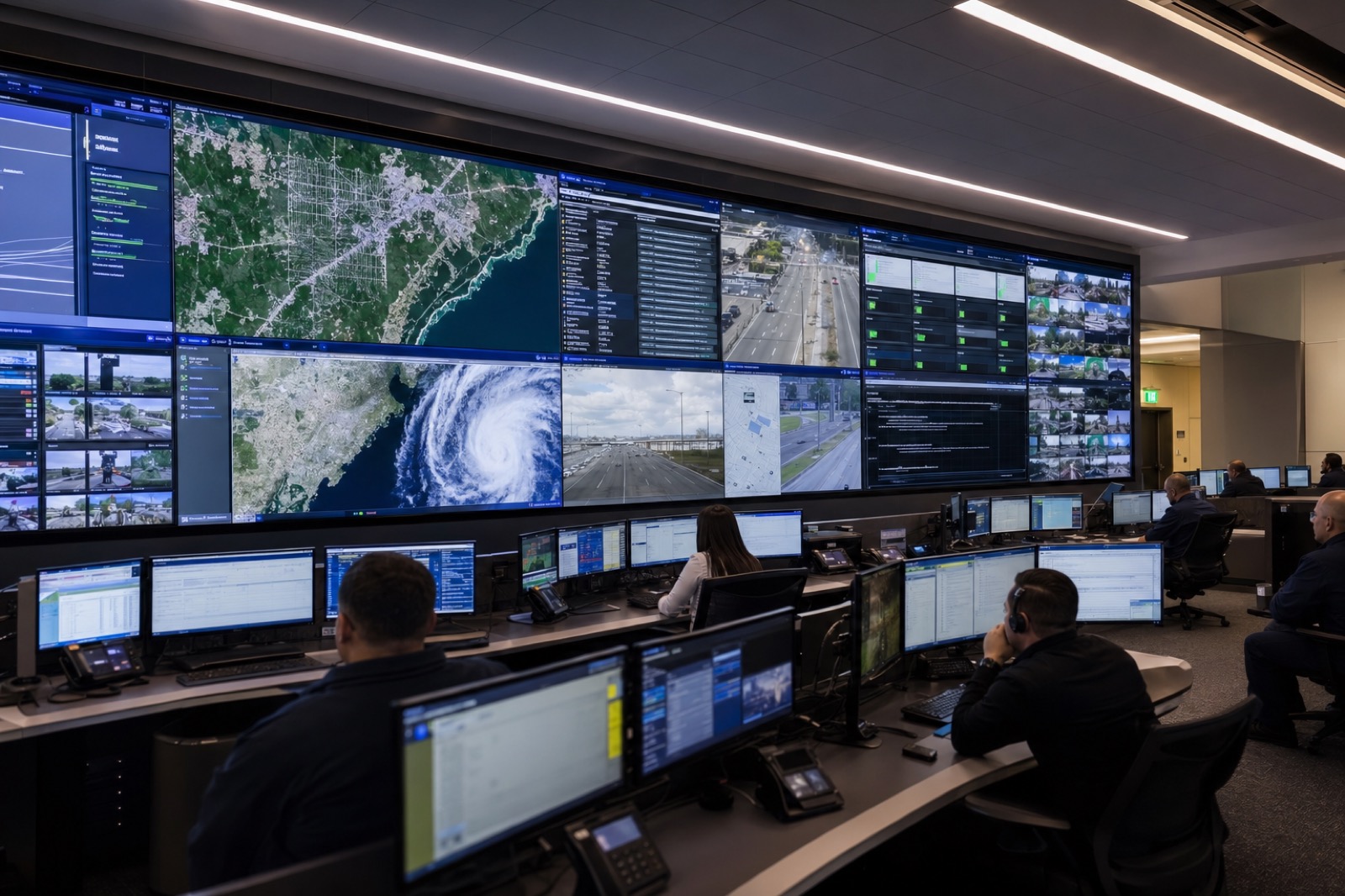
When agencies talk about upgrading an Emergency Operations Center, the conversation often starts with the video wall.
That makes sense. The video wall is the most visible part of the room. It signals readiness, scale, and command presence. It is often the first thing visitors notice and the first item leaders ask about when planning a new EOC.
But a resilient EOC is not a display showcase.
It is a decision environment.
During an emergency, operators need to see the right information, hear the right people, route the right sources, and stay coordinated across departments, agencies, and locations. The room has to support fast decisions, clear communication, shared situational awareness, and operational continuity.
If the room looks impressive but the audio is unclear, the sources are hard to route, the displays are poorly organized, remote participants cannot be heard, or the system fails when the network is stressed, the technology becomes a liability.
That is why emergency operations center AV planning has to go deeper than screens and square footage.
A well-designed EOC brings together audiovisual systems, unified communications, network architecture, security, redundancy, ergonomics, and support into one coordinated environment. The goal is not simply to show more information. The goal is to help teams understand what is happening, coordinate the response, and keep working when conditions are difficult.
This checklist is designed to help government agencies, public safety teams, emergency managers, IT leaders, and facilities teams evaluate what matters before building or upgrading an EOC.
1. Start With the Mission, Not the Equipment
The first mistake in many EOC projects is starting with technology before defining the room’s operational purpose.
Before selecting displays, microphones, cameras, codecs, control panels, or AV-over-IP platforms, agencies should define how the EOC will actually be used.
An EOC may need to support:
- Severe weather response
- Public safety incidents
- Transportation disruptions
- Cyber incidents
- Utility outages
- Public health events
- Large public gatherings
- Multi-agency coordination
- Executive briefings
- Media updates
- Daily monitoring
- Training and tabletop exercises
Each use case places different demands on the room.
A daily monitoring environment may prioritize dashboards, traffic feeds, GIS maps, and camera views. A full activation may require multiple agencies, multiple communications channels, remote participants, public information officers, and executive leadership in the same room. A cyber incident may require secure screen sharing, protected data handling, and coordination between IT, leadership, legal, and operations.
The room should be designed around those workflows.
Planning questions to ask
- What types of incidents will this EOC support?
- Who sits in the room during normal operations?
- Who joins during partial or full activation?
- Which agencies, departments, or outside partners need to participate?
- What information sources are most critical during the first 15 minutes of an incident?
- What information needs to stay visible throughout an activation?
- Who has authority to change layouts, route sources, or start calls?
- What happens if the primary network, display system, or UC platform is unavailable?
A good EOC design begins with these answers. The technology should serve the operating model, not the other way around.
2. Design for a Common Operating Picture
One of the primary goals of an EOC is to create a shared view of what is happening.
That does not mean every screen should show everything all the time. In fact, too much visual information can make the room harder to use. A strong EOC display strategy helps teams separate what is urgent, what is contextual, and what is supporting information.
The common operating picture may include:
- GIS maps
- Weather radar
- CAD or dispatch data
- Camera feeds
- Traffic information
- Building systems
- Utility status
- Social media monitoring
- News broadcasts
- Incident dashboards
- Resource tracking
- Public safety alerts
- Unified communications windows
- Remote agency feeds
- Executive briefing materials
The key is not just getting those sources onto a wall. The key is organizing them in a way that supports decisions.
For example, a weather event layout may place radar, affected infrastructure, field reports, shelters, and public messaging status in defined zones. A public safety incident may prioritize camera feeds, GIS, dispatch status, command communications, and agency coordination. A cyber incident may prioritize network status, incident timeline, response team communications, and executive briefing materials.
The video wall should support different operational modes, not just one static layout.
Video wall checklist
Your EOC display system should answer these questions:
- Can operators quickly change layouts based on incident type?
- Can the wall show multiple sources at once without clutter?
- Can remote participants and shared content appear in predictable locations?
- Can the system display both real-time feeds and static briefing content?
- Can users route content without needing a specialist in the room?
- Are layouts standardized so operators know where to look?
- Are font sizes, map details, and dashboards readable from real seating positions?
- Can the room continue operating if one display or processor fails?
- Can critical sources be shown on secondary displays if the main wall is unavailable?
The video wall is important, but it should not be treated as a giant monitor. It should be treated as a shared decision surface.
3. Build Around Operator Sightlines and Room Ergonomics
An EOC can have excellent technology and still be frustrating to use if the room layout is wrong.
Operators may spend long hours in the room during an activation. They need clear sightlines, comfortable viewing angles, usable workstations, practical cable access, and lighting that supports both screen visibility and human endurance.
Common design issues include displays mounted too high, workstations placed too close to large screens, lighting that creates glare, camera positions that show awkward angles, and microphones that pick up too much room noise.
The room layout should be planned around people first.
Room design checklist
Evaluate:
- Where operators sit
- Where leadership sits
- Where remote participants appear
- Where shared displays are located
- How people move through the room
- How side conversations are managed
- How briefings are conducted
- How long activations typically last
- How the room supports shift changes
- How the room supports accessibility needs
A resilient EOC should also account for lighting and acoustics.
Bright overhead lighting can cause glare and fatigue. Poor acoustics can make voices harder to understand. Glass walls, hard floors, exposed ceilings, and reflective surfaces can create echo that undermines even high-quality audio systems.
The best rooms are not just technically capable. They are comfortable enough for teams to use for hours under pressure.
4. Treat Audio as a Mission-Critical System
Many EOC projects underinvest in audio.
That is a serious mistake.
In an emergency operations environment, unclear audio slows decisions. If participants have to repeat themselves, if remote callers sound distant, if microphones pick up side conversations, or if the room has echo, the system is not supporting the mission.
Audio is especially important because EOCs often include a mix of in-room participants, remote agency partners, field personnel, executives, and subject matter experts. The room may need to support normal discussion, briefings, conference calls, Teams or Zoom meetings, phone calls, and media preparation.
EOC audio checklist
A strong EOC audio design should include:
- Proper microphone coverage for all primary seats
- Clear loudspeaker coverage across the room
- Echo cancellation for remote meetings
- Noise control for HVAC and room reflections
- DSP configuration tuned for the room
- Simple mute and volume controls
- Support for remote participants
- Support for hybrid briefings
- Clear audio from video sources
- Proper gain structure across all systems
- Assistive listening considerations when required
- Documented audio presets for different room modes
The goal is simple: every participant should be able to hear and be heard without thinking about the technology.
That sounds basic, but it is one of the biggest differences between a room that looks ready and a room that performs under pressure.
5. Plan Unified Communications Before the Room Opens
Most EOCs now need to support hybrid operations.
Not everyone who matters will be in the room. Some agency partners may join remotely. Some subject matter experts may be off-site. Some leaders may join from another building, another locality, or the field.
That means unified communications cannot be an afterthought.
The EOC may need to support Microsoft Teams, Zoom, Webex, SIP calling, standard phone lines, mobile participants, conference bridges, and other agency-specific platforms. It may also need to support secure collaboration with outside organizations that do not use the same tools.
UC planning checklist
Before designing the room, define:
- Which UC platforms are approved by IT?
- Which platforms are used by partner agencies?
- Which platform is primary during activation?
- What is the backup if the primary UC platform is unavailable?
- Will the room need one large meeting or multiple simultaneous calls?
- Can operators share content from local workstations into remote meetings?
- Can remote participants see the right camera view?
- Can remote participants hear everyone clearly?
- Can in-room participants hear remote speakers without echo or delay?
- Who starts, joins, manages, and ends calls?
- Are meeting links, dial-in details, and call procedures part of the EOC runbook?
The best UC experience is not the most complicated one. It is the one operators can use quickly during a stressful moment.
If the only person who knows how to launch the right meeting is not in the building, the workflow is not resilient.
6. Think Interoperability, Not Just Connectivity
Connectivity means systems can plug in.
Interoperability means teams can actually work together.
That distinction matters in emergency operations.
An EOC often brings together departments and agencies with different tools, networks, communication habits, and security requirements. The AV and UC system must support coordination across those boundaries.
That does not mean every system should be merged or every source should be available to everyone. It means the room should be designed with clear pathways for sharing approved information with the right participants.
Interoperability considerations
Agencies should evaluate:
- Which partners need to share content into the room?
- Which partners need to receive content from the room?
- Which networks are allowed to touch the AV system?
- Which sources are restricted?
- Which users can route sensitive content?
- Which sources can be recorded?
- Which sources can be shared in public briefings?
- Which tools are needed for mutual aid or multi-jurisdictional events?
- How will procedures be documented and practiced?
This is where technology, policy, and operations meet.
An AV integrator can design the signal flow, but the agency still needs governance. The room should reflect how information is allowed to move during an incident.
7. Validate the Network Before Choosing an AV Architecture
Modern EOCs often rely on networked AV.
That can be a powerful approach. AV-over-IP can make it easier to route sources, scale systems, support flexible layouts, and distribute content to multiple rooms or buildings.
However, AV-over-IP depends on the network.
That means IT needs to be involved early. Waiting until installation to discuss VLANs, switch capacity, multicast, Quality of Service, IP addressing, authentication, and monitoring can create delays, cost increases, and operational risk.
Network readiness checklist
Before deploying networked AV, validate:
- Available switch capacity
- Bandwidth requirements
- Multicast support
- VLAN design
- QoS requirements
- IP addressing
- Network segmentation
- 802.1X or other authentication requirements
- Monitoring and alerting
- Remote management policies
- Firmware update procedures
- Physical port security
- Cybersecurity review requirements
- Documentation ownership
- Change management process
The AV system should not be treated as separate from the IT environment. In an EOC, AV is part of the operational technology stack. It has to be visible, manageable, secure, and supportable.
8. Make Cybersecurity Part of the AV Design
EOC technology often touches sensitive information, operational data, public safety systems, agency networks, and external communications.
That makes cybersecurity a core design requirement.
Modern AV systems may include networked endpoints, touch panels, DSPs, cameras, wireless sharing devices, encoders, decoders, control processors, servers, cloud management portals, and remote access tools. Each connected device needs to be considered within the agency’s cybersecurity program.
Cybersecurity checklist for EOC AV and UC
Agencies should require clear answers to these questions:
- What devices will be connected to the network?
- What ports, protocols, and services are required?
- How are devices authenticated?
- Are default passwords removed?
- How are administrator accounts managed?
- Can devices integrate with centralized identity management?
- How are firmware updates handled?
- How are vulnerabilities tracked?
- Is remote access required?
- If remote access is required, how is it secured and approved?
- Are system logs available?
- Can the system be monitored by IT?
- Are wireless presentation tools approved?
- Is sensitive content protected from accidental sharing?
- Are vendor support procedures documented?
- Is there a plan to decommission or replace devices at end of life?
Cybersecurity should not be bolted on after the room is built.
It should influence product selection, network design, user permissions, monitoring, documentation, and support from the beginning.
9. Design for Redundancy and Graceful Degradation
A resilient EOC does not assume everything will work perfectly.
It assumes something will eventually fail and plans accordingly.
The question is not just, “Can the system work?”
The better question is, “What happens when part of the system stops working?”
A room may lose a display, a codec, a network switch, a microphone, a control processor, an internet connection, or a cloud service. A strong design provides backup paths and simple fallback procedures so the room can continue operating.
Resiliency checklist
Evaluate:
- UPS protection for critical equipment
- Generator-backed power where available
- Redundant network paths where appropriate
- Spare AV endpoints for critical routes
- Local display capability if the main wall is unavailable
- Backup UC joining method
- Backup audio path
- Backup control method
- Local source connection options
- Printed or offline runbooks
- Spare cables and adapters
- Documented escalation contacts
- Preventive maintenance schedule
- Annual failover testing
Not every room needs full duplication of every component. That can become expensive and unnecessary.
But every EOC needs a practical continuity plan.
The right question is: which failures would stop the room from performing its mission, and how can those risks be reduced?
10. Simplify the Control Experience
The control system is where many technically capable rooms become operationally confusing.
During an emergency, operators should not have to understand the AV system architecture. They should not need to know which processor, codec, input, matrix, decoder, or DSP path is involved.
They need simple controls that match the way the room is used.
Control system checklist
A strong EOC control interface should include:
- Clear room modes
- Incident-based presets
- Simple source routing
- Role-based permissions
- Obvious mute controls
- Clear call controls
- Display layout presets
- Volume control by zone
- Help or support contact information
- Lockout options for critical layouts
- Consistent naming conventions
- Minimal hidden menus
- Training mode where appropriate
Good control design removes cognitive load.
Instead of asking an operator to build a layout from scratch, the system should offer options such as:
- Daily Monitoring
- Weather Event
- Public Safety Incident
- Executive Briefing
- Hybrid Coordination
- Media Briefing
- Training Exercise
Each preset should automatically configure displays, audio, cameras, and UC settings as much as possible.
11. Include Overflow Rooms, Breakout Spaces, and Executive Briefing Areas
The main EOC is rarely the only room involved during an activation.
Agencies may also need:
- Policy rooms
- Joint information center spaces
- Executive briefing rooms
- Call center areas
- Departmental coordination rooms
- Training rooms
- Overflow spaces
- Media briefing areas
These spaces may need to view selected EOC content, join calls, receive briefings, or operate independently.
Planning these spaces early helps avoid a common problem: the main room is upgraded, but the surrounding rooms still depend on ad hoc cables, consumer displays, laptop speakers, and improvised workflows.
Multi-room planning checklist
Consider:
- Which rooms need access to EOC content?
- Which rooms need to send content back to the EOC?
- Which rooms need UC capability?
- Which rooms need audio reinforcement?
- Which rooms need recording or streaming?
- Which rooms need restricted access?
- Which rooms should be able to operate if the main EOC is unavailable?
- Which rooms need standardized controls?
An EOC is not just a room. It is often a connected operational environment.
12. Plan for Recording, Streaming, and Public Information
Some activations require records. Some require internal briefings. Some require public communications. Some require all three.
Recording and streaming should be designed carefully because they introduce operational, legal, privacy, and cybersecurity considerations.
Agencies should define what can be recorded, who can start recording, where recordings are stored, how long they are retained, and what content should never be included in a public feed.
Recording and public information checklist
Define:
- Which meetings may be recorded?
- Who is allowed to record?
- Where recordings are stored?
- How retention policies are applied?
- What content is excluded from recording?
- Which camera views are approved for public briefings?
- Which microphones are active during media updates?
- How captions or accessibility requirements are handled?
- How public information officers access the system?
- How sensitive operational information is protected?
This is especially important in rooms where the same technology may support internal coordination and public messaging. The workflow must prevent accidental sharing of sensitive content.
13. Build Training Into the Project
An EOC upgrade is not complete when the equipment is installed.
It is complete when the team can use it confidently.
Training should include more than a quick handoff. Operators need role-specific instruction, practical scenarios, quick reference guides, and refreshers. IT needs documentation. Facilities needs awareness of power, cooling, and room considerations. Leadership needs confidence that the room will support the mission during activation.
Training checklist
A complete training plan may include:
- Operator training
- Administrator training
- IT support training
- Executive user orientation
- Scenario-based exercises
- Quick reference guides
- Recorded walkthroughs
- Control panel cheat sheets
- Source routing practice
- UC call practice
- Failover drills
- Annual refresher training
The best time to discover confusion is during training, not during an incident.
14. Establish a Support and Lifecycle Plan
EOCs are too important for a break-fix-only support model.
If the room sits unused for long periods, systems can drift. Firmware ages. Passwords expire. UC platforms change. Certificates expire. Displays develop issues. Microphones get moved. Network policies change. The room may look ready but fail at the moment it is needed.
A support plan keeps the environment operational.
Lifecycle and support checklist
Agencies should plan for:
- Preventive maintenance
- Regular system testing
- Firmware management
- Spare equipment strategy
- Display calibration
- Microphone and speaker testing
- Control system updates
- UC platform validation
- Network configuration review
- Asset inventory
- Warranty tracking
- Documentation updates
- Help desk escalation process
- SLA expectations
- End-of-life planning
A resilient EOC is not a one-time project. It is an operational capability that needs care over time.
15. Common EOC AV Mistakes to Avoid
Here are some of the most common issues agencies should avoid when planning an EOC upgrade.
Mistake 1: Designing around the video wall only
A large display system is useful, but it cannot compensate for poor audio, confusing controls, weak workflows, or an unreliable network.
Mistake 2: Bringing IT in too late
Networked AV, UC, cybersecurity, remote support, identity management, and monitoring all require IT involvement. IT should be part of the project from the beginning.
Mistake 3: Ignoring audio quality
If people cannot hear clearly, coordination suffers. Audio should be treated as mission-critical, not secondary.
Mistake 4: Making the control system too complicated
An EOC control interface should be simple enough to use under pressure. Presets, clear labels, and role-based workflows matter.
Mistake 5: Assuming the room will only be used one way
EOCs support different incident types, staffing levels, and communication needs. The system should support multiple modes.
Mistake 6: Forgetting about training
A powerful system that only one person understands is not resilient.
Mistake 7: Failing to test backup procedures
Redundancy only matters if the team knows how to use it. Failover procedures should be tested before they are needed.
A Practical EOC AV and UC Readiness Checklist
Use this list as a starting point before beginning an EOC project.
Mission and workflow
- Defined incident types the room must support
- Identified daily, partial activation, and full activation workflows
- Defined user roles and permissions
- Documented partner agencies and remote participants
- Defined source priorities for each activation type
- Established decision-making and briefing workflows
Displays and visualization
- Display sizes matched to room dimensions and viewing distance
- Layouts defined by incident type
- Critical sources identified
- Content zones planned
- Secondary displays considered
- Overflow viewing requirements documented
- Readability tested from real seating positions
Audio
- Microphone strategy defined
- Loudspeaker coverage planned
- Echo cancellation included
- Room acoustics evaluated
- Audio from remote participants validated
- Audio from video sources included
- Assistive listening needs considered
- Mute and volume controls simplified
Unified communications
- Approved UC platforms identified
- Backup UC process defined
- Camera views planned
- Content sharing workflow documented
- External participant process defined
- Call control ownership assigned
- Meeting templates or room accounts configured
Network and cybersecurity
- IT involved early
- Network capacity validated
- VLAN and segmentation strategy defined
- Authentication requirements documented
- Device inventory planned
- Firmware process established
- Remote access policy defined
- Logging and monitoring considered
- Cybersecurity review completed
Control and automation
- Room modes defined
- Incident presets created
- Source names standardized
- User permissions assigned
- Support contact built into workflow
- Manual backup controls documented
- Operators trained on common tasks
Redundancy and continuity
- UPS protection planned
- Critical failure points identified
- Backup display options considered
- Backup audio path considered
- Backup UC method documented
- Spare equipment strategy defined
- Failover tested
- Runbooks available offline
Support and lifecycle
- Preventive maintenance schedule created
- SLA expectations defined
- Warranty information documented
- Firmware and patching process assigned
- Annual testing planned
- Training refreshers scheduled
- End-of-life roadmap established
What a Strong EOC Technology Partner Should Bring to the Table
An EOC project is not just an AV installation. It requires coordination between emergency management, IT, facilities, leadership, procurement, cybersecurity, and the people who will use the room during real events.
A strong partner should be able to help with:
- Discovery and workflow planning
- Room layout and sightline evaluation
- Display system design
- Audio system design
- Unified communications integration
- AV-over-IP and network coordination
- Control system programming
- Cybersecurity-aware design
- Documentation and training
- Testing and commissioning
- Preventive maintenance and support
- Lifecycle planning
The right partner should ask operational questions before recommending equipment.
What decisions need to be made in the room? Who needs to participate? What information matters most? What systems are approved by IT? What happens if the primary system fails? Who supports the environment after installation?
Those questions lead to better designs and fewer surprises.
How VIcom Helps Agencies Build More Resilient EOCs
VIcom helps government agencies design, deploy, and support AV and unified communications environments that are built around real operational needs.
For Emergency Operations Centers, that means looking beyond the video wall and considering the full room experience:
- What operators see
- What participants hear
- How sources are routed
- How remote teams join
- How the network supports the system
- How cybersecurity requirements are addressed
- How the room performs during long activations
- How the system is supported after installation
Whether an agency is modernizing an existing EOC, expanding hybrid coordination capabilities, improving situational awareness, or planning a new command environment, VIcom can help assess the current state, identify gaps, and build a practical roadmap.
The result is a room that does more than look ready.
It works when the mission depends on it.
Planning an Emergency Operations Center upgrade?
VIcom can help your team evaluate the room, workflows, AV systems, unified communications requirements, network readiness, and long-term support model needed to build a more resilient EOC.
Connect with VIcom by filling out the form below.