
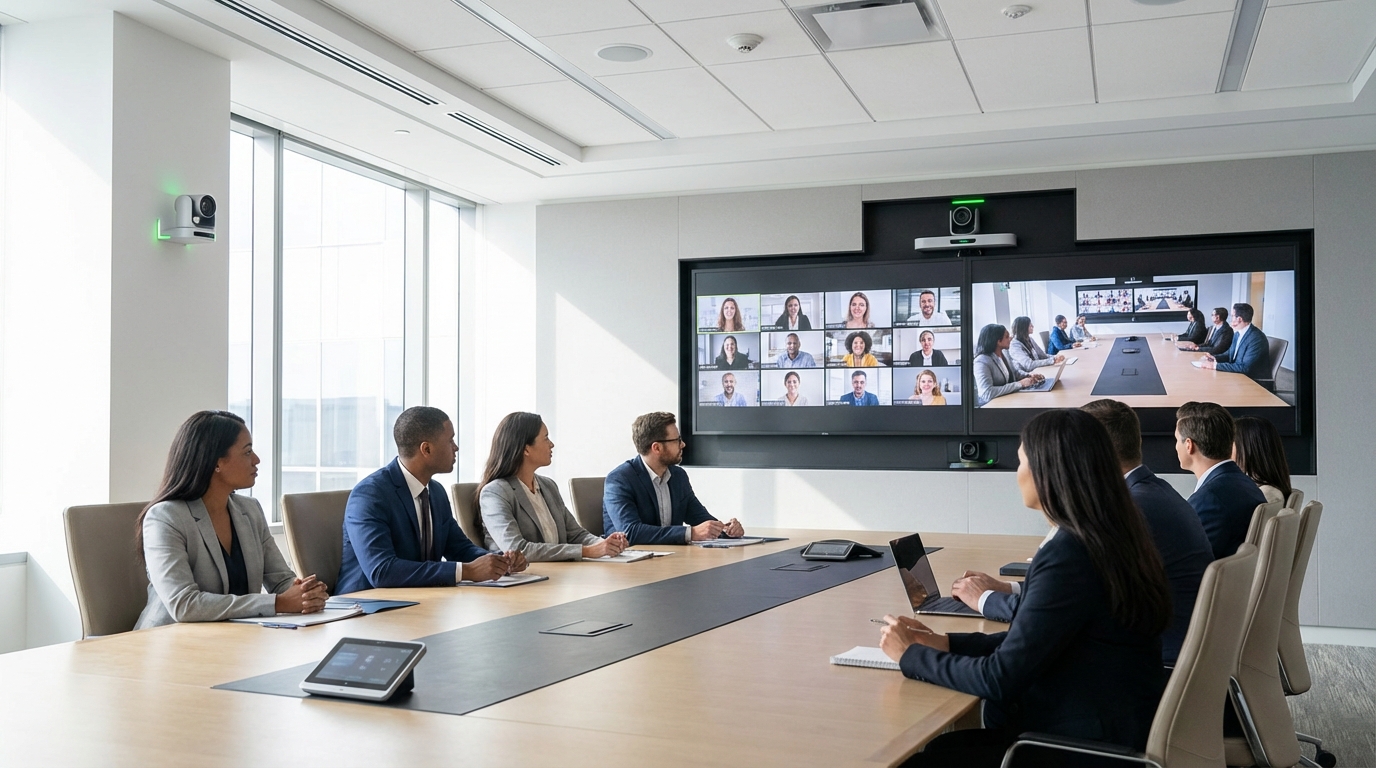
At ISE 2026, industry analysts stated flatly that if you don’t have a multi-camera meeting room, you’re going to have one this year. That’s not hype — it’s a reflection of what enterprise employees now expect from hybrid meetings, and what the technology has finally made cost-justifiable. The question is no longer whether to deploy multi-camera systems; it’s how to design them so they actually work.
Why Multi-Camera Matters: Meeting Equity Is the Real Driver
Remote participants have been getting a second-class experience in hybrid meetings for years. A single static camera at the front of a 12-person conference table shows remote participants whoever happens to be in frame, with no ability to track who’s speaking, read body language across the table, or see the person who just made a comment from the far end of the room.
Multi-camera setups give remote participants a more complete picture of the room. Microsoft Teams now allows remote participants to switch between available camera views themselves — choosing the angle that gives them the most context. That’s a meaningful shift in meeting equity, and it’s changing what employees expect when they walk into a conference room.
The business case is straightforward: if your remote participants consistently feel like they’re watching a meeting happen rather than participating in one, the quality of decisions made in hybrid settings degrades. That has measurable impact on organizations that have committed to hybrid work.
When Single-Camera Is Adequate — and When It Isn’t
Not every room needs multiple cameras. A quality PTZ camera with AI auto-framing handles single-camera rooms effectively for most use cases, and deploying multi-camera systems where they aren’t needed adds cost and complexity without proportional benefit.
Single-camera is typically adequate for:
- Huddle rooms and small conference rooms with 6–8 participants or fewer
- Rooms where a quality PTZ with auto-framing can physically cover the entire table
- Informal spaces where call quality expectations are lower
The multi-camera threshold appears when room size and configuration outpace what a single camera can cover with useful framing. Specifically: rooms with 8 or more participants where table length exceeds 12–14 feet; L-shaped or U-shaped configurations where a single front-of-room camera can’t see everyone; rooms with a presentation area physically separate from the discussion table; and executive boardrooms where every participant’s visibility is a business expectation, not a nice-to-have.
The Current Product Landscape (February 2026)
Camera technology for multi-room deployments has matured considerably. These are the platforms VIcom’s engineers work with regularly and the relevant characteristics for each.
Crestron 1 Beyond i12D
The 1 Beyond i12D is an intelligent camera with 12x optical zoom and computer vision-based tracking. It works within the Crestron ecosystem and selectively with third-party systems, and it’s earned a reputation for reliable switching logic in complex room configurations — particularly rooms where the AI needs to make judgment calls about speaker transitions in noisy or highly active environments.
Logitech Rally AI Camera
The Rally AI Camera handles autonomous camera directing without requiring external controllers or touch panels. Its strong integration with the broader Logitech Rally ecosystem and its accessible price point make multi-camera configurations more budget-feasible for organizations that previously considered them out of reach.
HP Poly VideoOS 5.1 DirectorAI
HP Poly builds multi-camera switching logic directly into the Poly room system software. DirectorAI, shipping in the VideoOS 5.1 update, uses AI speaker detection to determine the optimal camera selection — reducing the need for external switching controllers and keeping the system architecture cleaner.
Cisco Room Kit Pro G2
The Room Kit Pro G2 is AVoIP-first with 8 PoE camera ports, purpose-built for complex room configurations with multiple simultaneous camera sources. It’s scheduled to ship in Q2 2026. For organizations already running Cisco collaboration infrastructure, it’s the logical anchor for high-complexity rooms.
Yealink MVC Multi-Camera
For organizations standardized on Yealink hardware, the MVC multi-camera solution integrates cleanly with their existing room system lineup. It’s a solid choice when the goal is consistency across a large portfolio of rooms rather than selecting the optimal platform for each room independently.
Infrastructure Requirements That Catch Teams Off Guard
Camera hardware gets most of the attention in multi-camera design conversations, but infrastructure decisions made before installation day determine whether the system is reliable in year one and year three.
PoE switch capacity is the first thing to plan. Multi-camera rooms require additional PoE budget on the switch serving that room. Plan for 15.4W to 30W per camera depending on whether you’re running fixed or PTZ units — and verify that the switch’s power budget actually supports simultaneous full draw across all ports, not just the rated-per-port figure.
USB extenders are underestimated more often than any other infrastructure requirement. Camera-to-compute distances in conference rooms frequently exceed USB cable length limits. Without proper USB extension — optical or active — the camera connection becomes intermittent, which destroys confidence in the whole system far more effectively than any software bug.
Ceiling pre-wire is the highest-value decision you can make during construction. Camera mounting positions should be planned during construction or renovation, not retrofitted. Ceiling-mounted cameras require conduit runs that cost a fraction as much to install before drywall closes. Retrofitting even a single ceiling conduit run after construction adds labor, disruption, and cost that could have been avoided entirely with a brief conversation during the design phase.
Network bandwidth also deserves a line item in the design review. Each active camera stream adds approximately 5–15 Mbps to the network requirements for that room. Multi-camera rooms need dedicated QoS policies that prioritize AV traffic — without them, stream quality degrades exactly when the network is most congested, which is when meetings matter most.
AI Switching vs. Operator-Controlled vs. User-Selected
How the camera selection gets made is as important as which cameras you install.
AI-powered switching (the default for most enterprise deployments) switches cameras automatically based on speaker detection and room analytics. It carries the lowest operational burden and delivers acceptable results for the vast majority of enterprise meeting use cases. The AI logic isn’t perfect, but it’s good enough that most participants stop thinking about camera selection within a few minutes of the meeting starting.
Operator-controlled switching puts a dedicated AV technician or room support staff member in real-time control of camera selection. This is appropriate for all-hands events, formal presentations, and any situation where broadcast-quality production matters. It’s not a scalable approach for daily conference room use, but it’s the right tool for high-stakes events.
User-selected views (the Microsoft Teams feature that lets remote participants choose their camera angle) provides a useful override when AI switching makes choices remote participants disagree with. It works alongside AI switching rather than replacing it — most remote participants won’t actively switch views, but having the option reduces frustration in the minority of cases where the AI picks wrong.
Camera-Follows-Voice: Pairing Cameras with Ceiling Microphone Arrays
The most reliable multi-camera tracking doesn’t rely solely on video-based speaker detection. Pairing a multi-camera system with a ceiling microphone array — specifically the Shure MXA920 or Biamp Parlé — enables camera tracking based on detected voice location. The microphone array identifies which acoustic zone the speaker is in and signals the camera system to point to that zone.
This is meaningfully more reliable than pure video-based detection in rooms with complex lighting, glass walls, or participants who move around. The microphone knows where the voice is. The camera follows. The combination eliminates the most common failure mode of AI camera systems: the camera switching to a person who moved, not a person who spoke.
Room Design Templates by Size
These templates reflect VIcom’s standard starting points. Every room gets adjusted based on actual dimensions, furniture configuration, window placement, and lighting conditions.
Medium Room (8–14 seats)
One PTZ camera at the front wall, one fixed wide-angle at the side or ceiling covering the near-table zone. Ceiling microphone array with a minimum of 8 elements. AI switching via the room system. This configuration covers the table comprehensively without requiring a dedicated switching controller.
Large Room (15+ seats)
Front PTZ, two side-mounted fixed cameras covering distinct table zones, and an optional ceiling-mounted overview camera for establishing shots. DSP-based audio with multiple ceiling microphones, zoned to match the camera coverage areas. This scale requires dedicated camera switching logic — either Crestron 1 Beyond or the Cisco Room Kit Pro G2 — to manage the increased complexity of camera selection across more zones.
Design Decisions Happen Before Installation Day
Camera placement decisions made on the day of deployment are camera placement decisions made wrong. By the time a deployment truck pulls up, conduit is already in the ceiling, power is already allocated, and network ports are already punched. Changing any of those after the fact is expensive and disruptive.
VIcom’s camera placement decisions happen during the Consult and Design phases — before anything is installed. That means walking the room, measuring the table, checking the ceiling structure, reviewing the lighting plan, and confirming the network infrastructure can support the system being designed. It’s not glamorous work, but it’s what separates multi-camera systems that work reliably from ones that get written off as “the video system doesn’t really work.”
If your organization is planning a conference room renovation, a new building build-out, or a portfolio-wide hybrid meeting upgrade, Our seasoned engineers can walk your specific rooms and build a multi-camera design that matches your infrastructure and your budget. Let’s schedule a free consultation today!